![OCI — Unified Authentication with Azure Identities [Part 1]](/images/blog/oci-unified-authentication-with-azure-identities-part-1/featured.png)
How do you keep Azure as your primary identity provider while letting users access both the OCI console and Linux systems with their existing credentials? There's no single article that covers both SAML SSO and Linux PAM authentication with a central identity store. This series aims to fill that gap.
The Problem
Consider a user named "Bob." Bob needs a single identity that works across:
- OCI Console (web-based access via browser)
- Linux SSH (command-line access to OCI compute instances)
Bob shouldn't need separate credentials for each. His existing Active Directory identity should be the single source of truth.
1,000ft View
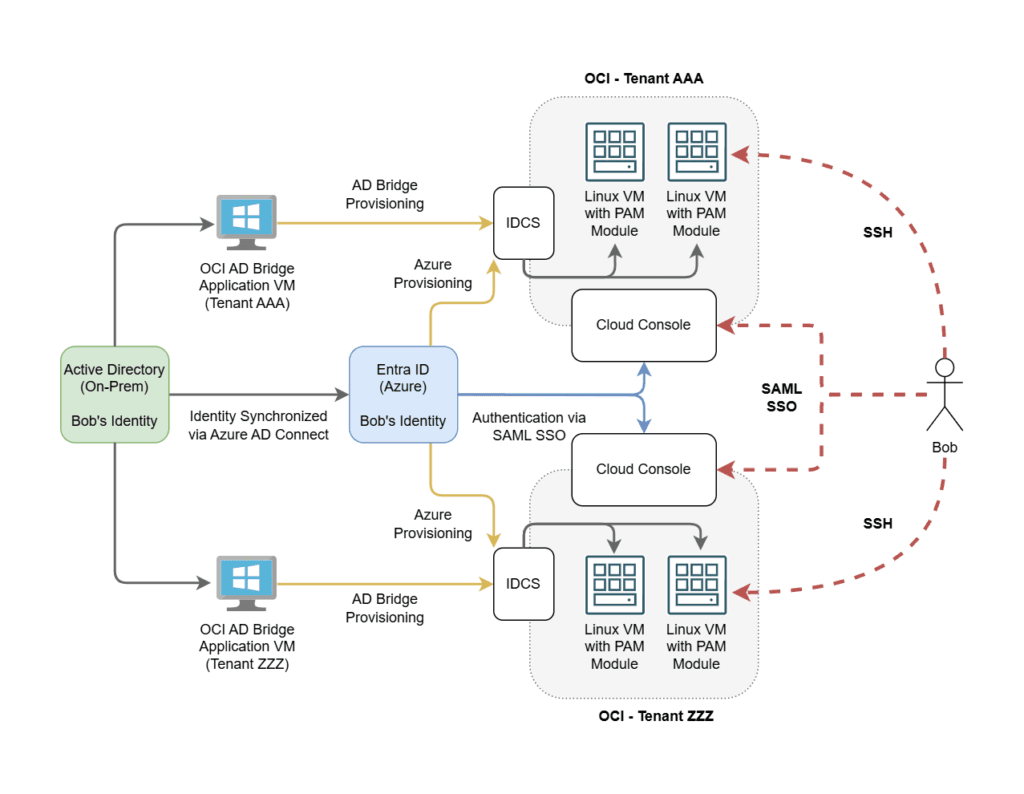
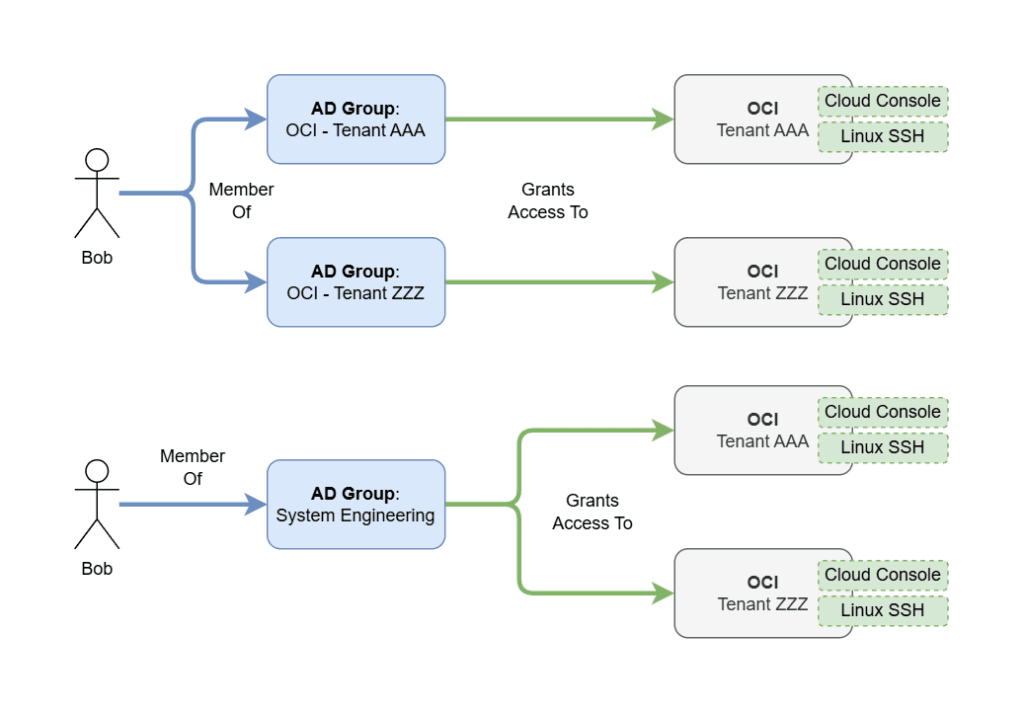
Prerequisites
This solution requires:
- An on-premises Active Directory domain
- An Entra ID (Azure AD) tenant
- Microsoft Entra Connect (formerly Azure AD Connect) syncing on-prem identities to Entra ID
How It Works
The architecture uses two separate authentication flows:
- Console access uses Federated Authentication (SAML SSO to Azure). Users click "Sign in with Azure" on the OCI login page and get redirected to Azure for authentication.
- Linux PAM uses Delegated Authentication (SSSD authenticating against OCI Identity Cloud Service / IDCS). The PAM module on each Linux host validates credentials against OCI's identity store.
Key Design Points
- Both Entra ID and the OCI AD Bridge must sync the same user objects from Active Directory. This creates a double-sync pattern where the same users exist in both Entra ID and OCI.
- The AD Bridge reflects account status directly from the domain. Disabling an AD account immediately affects all OCI tenants that the AD Bridge syncs to.
- Entra Enterprise Apps work independently per OCI tenant. You can have different provisioning rules for different OCI environments.
- PAM relies on POSIX IDs. Each user needs a custom
linuxUIDattribute, and each group needs alinuxGIDattribute. These are stored as custom attributes in Entra ID. - Entra ID unofficially supports custom attribute passthrough to OCI via SCIM provisioning. This is how POSIX IDs get from AD to OCI.
- The AD Bridge supports custom attributes for Users only, not for Groups. Group GIDs must be provisioned separately through the Entra Enterprise App's SCIM mappings.
- There is no known way to use Federated Auth directly for Linux PAM. The delegated authentication path through IDCS is required.
Series Overview
This series walks through the complete setup:
- Part 1 (this post) — Architecture overview and key concepts
- Part 2 — Console Auth via Azure SAML SSO
- Part 3 — Configuring Delegated Authentication
- Part 4 — Deploying the Linux PAM Module
- Part 5 — API Calls and Troubleshooting